Windows Installer 1618: Another Installation Is in Progress
This package cannot start while another installation is running. Understand the context and follow diagnostic checks and verification, with an original diagram and official references.
This guide explains the message in context, walks through focused checks and verifies the outcome. The website does not run commands on your device; choose an appropriate action after understanding its conditions.

What the message means
1618 means Windows Installer is occupied by another installation. Its window may be visible or it may be a background update. Launching additional setup copies does not create a reliable queue and can obscure which operation remains active. Identify the active work first.
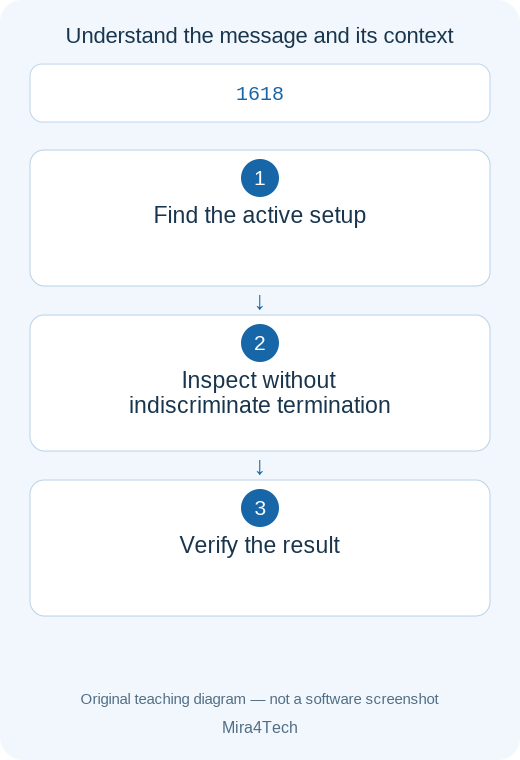
Prepare a controlled check
Keep the message, time, app or device name and version. Save work and use a non-sensitive training file when testing. Start with an observable check, change one factor and record the result. On a managed device, follow your authorised access and organisation policies.
Step 1: Find the active setup
Check open windows, the taskbar and Windows Update. Complete an authorised pending prompt and wait for the final result. A small dialog behind another window can keep setup waiting without meaning that it has crashed.
Step 2: Avoid repeated launches
Cancel newly opened setup copies through their own controls when possible and keep one clear attempt. Clicking Install repeatedly does not release Windows Installer and can make its messages harder to interpret.
Step 3: Inspect without indiscriminate termination
Task Manager can show setup activity, but the name msiexec.exe alone does not establish a hang or identify its owning product. Avoid End task or bulk termination while installers may be writing files or updating system components.
Step 4: Restart at an appropriate time
After saving work and confirming that no setup is making progress, complete a Windows-requested restart. Coordinate managed-device restarts with IT. Let automatic update activity settle before launching the intended package once.
Step 5: Escalate persistent contention
If the error returns after restarting, collect the package, publisher, failure time and available log. An organisation’s deployment tool may be starting another background installation. Contact its administrator or the publisher instead of deleting Installer records or disabling the service.
Verify the outcome
The first installation should finish and the intended setup should start without 1618. After completion, check Installed apps and launch the app. A process disappearing from Task Manager is not by itself proof of a successful installation.
When to stop and seek help
Stop before terminating update processes or clearing the Installer directory, especially on managed or important-data devices.
Two questions before another change
Is the code alone enough to choose a remedy?
No. The location and circumstances must match this guide. If a new code, message or stage appears, record it and establish its context before another action.
What evidence should I give support?
Provide the product and version, error and time, attempted checks and observed results. Redact passwords, recovery codes, identities and personal files. Verify a support provider before granting remote control.
Related practical guides
Sources and scope
Prepared and edited by the Mira4Tech team. The checking sequence uses documented message meanings and product guidance; it is not a claim of testing your device or proving one cause for every occurrence. Interface labels can vary with version and language.