Try it yourself

Linux permissions practice: read rwx and choose a bounded change

Assume a training file you own and traditional permissions without additional ACLs in the question.

Updated: 06/11/2026

Assume a training file you own and traditional permissions without additional ACLs in the question. File and directory permissions differ, and group membership affects access. Read the assumptions: real systems may add ACLs or policies.
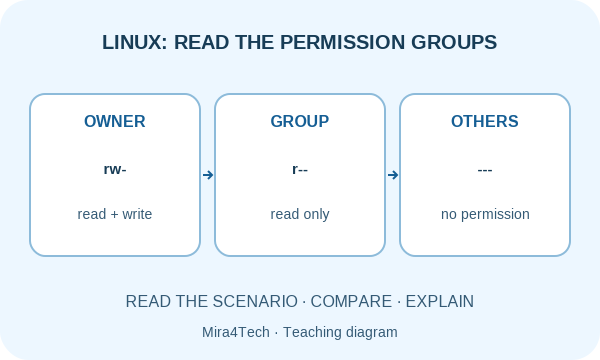
Teaching illustration for the practice module

How to work through a scenario

Read the goal and assumed environment, then separate known facts from untested assumptions. Compare choices with the task and distinguish inspection from modification. Choose an answer and review every explanation. If the outcome surprises you, return to the related guide and identify what changed your understanding.

Example scope and learning use

These bounded scenarios train understanding. Real environments can add different versions, policies or permissions. Output is authored example text and the page does not inspect your device. For real work, consult official documentation and your environment and use non-sensitive samples.

Sources and review

Prepared and edited by the Mira4Tech team. The teaching sequence uses format behaviour and app documentation. Menu names may differ by release and language; test a separate copy in your environment.

Interactive practice

Read the scenario conditions before answering. Review every choice after checking and retry if needed. The score covers these examples only.

Walk through the first scenario

Step through at your own pace, or play the walkthrough to follow each stage.

Identify environment and goal

-rw-r----- learner team notes.txt

Read the task precisely

-rw-r----- learner team notes.txt

Compare the action with the information needed

read → compare → explain

1. What permissions does the owner have?

The question concerns only the displayed regular file.

-rw-r----- learner team notes.txt

Explanation of every choice
  1. Read only — That describes the group triple r-- here.
  2. Execute only — There is no x in the owner triple.
  3. No permissions — That describes the others triple --- here.
  4. Read and write — Correct choice. The first permission triple after the file type, rw-, belongs to the owner.
2. What does 640 mean for a regular file?

Use traditional permissions only.

chmod 640 notes.txt

Explanation of every choice
  1. Owner executes only — Execute has value 1; 6 here is read plus write.
  2. The owner changes — chmod changes permissions; ownership is a different operation.
  3. Owner rw, group r, others none — Correct choice. 6 is read plus write, 4 is read, and 0 grants none.
  4. Everyone reads and writes — That does not match the owner, group and others digits.
3. Add execute for the owner only, keeping other bits. What fits?

The training file is a script you reviewed and own.

demo.sh

Explanation of every choice
  1. chmod a-x demo.sh — That removes execute from all classes rather than adding it for the owner.
  2. chmod u+x demo.sh — Correct choice. u selects the owner and +x adds execute without replacing all permissions.
  3. chmod 777 demo.sh — It grants everyone read, write and execute, exceeding the request.
  4. chown u+x demo.sh — chown handles ownership, not this symbolic permission change.
4. Which directory bit permits traversal of a known path?

Consider the basic directory bit without additional restrictions.

/home/learner/lab

Explanation of every choice
  1. x on the directories along the path — Correct choice. Directory search/traversal differs from executing a program file.
  2. w alone on the final file — File write permission does not replace directory traversal permission.
  3. Changing the extension — A filename does not grant traversal access.
  4. Having seen it in a previous listing — Seeing a name earlier does not establish current traversal permissions.
5. Inspect owner and group before changing them. What fits?

Inspect one file without modifying it.

notes.txt

Explanation of every choice
  1. chown root notes.txt — That attempts to change ownership rather than inspect it.
  2. chmod 000 notes.txt — That changes permissions instead of reading them.
  3. mv notes.txt archive.txt — That renames or moves the file rather than answering the ownership question.
  4. ls -l notes.txt — Correct choice. The long listing includes owner and group information.